Cyber security advice and training
Cyber security starts with you
Staying alert, thinking before you click, and reporting anything suspicious helps protect not just your data, but also your colleagues and the University’s reputation.
Even a small mistake – like sharing a password or clicking a bad link – can have big consequences. By following a few simple steps, you’ll help keep yourself, your colleagues, and the University safe online.
Report an incident or suspicious activity
If something doesn’t look right, report it straight away. Quick action helps us reduce risks and protect others.
| Situation | Action |
| You’ve lost University information, data, or a University device | Report a data breach straight away. |
| You’ve shared your password |
Change your password immediately and contact the IT Helpdesk. |
| You’ve received a phishing or suspicious email |
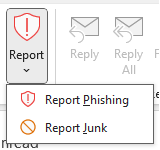
Don’t reply, click links, or open attachments. Report it in Outlook: Select the email → Report → Report phishing
|
Your cyber security checklist
1. Protect your password
Your Essex account is the key to your email, files, and personal data — so keeping your password secure is essential.
- Create a strong password – follow the NCSC’s advice and use three random words to make one that’s both long and memorable.
- Keep it unique to Essex – don’t reuse a password you’ve used elsewhere. If you have, change it right away.
- Remember it yourself – never write your password down or store it in apps not approved by the University.
- Keep it private – never share your password with anyone. The IT Helpdesk or the University will never ask you for it.
2. Defend against phishing attacks
Phishing is one of the most common threats we face at Essex. Attackers often try to trick staff and students with emails, texts, or calls that appear genuine but contain harmful links or attachments.
- Think before you click – don’t open unexpected attachments or follow suspicious links.
- Check who it’s really from – attackers may spoof “@essex.ac.uk” or similar domains.
- Pause if it feels urgent – be extra cautious with messages demanding passwords, payment details, or logins.
- Report it straight away – forward suspicious emails as an attachment to phishing@essex.ac.uk so we can investigate.
For more tips on spotting scam emails, texts, websites, and calls, see the NCSC’s phishing guide.
3. Secure your devices
- Lock it – always lock your laptop, tablet, or phone when you step away. Use a PIN, password, or fingerprint/Face ID to prevent anyone else from accessing it.
- Keep software updated – updates often include important security patches. Even if IT Services manages updates, install any prompts you receive.
- Keep devices secure – never leave your device unattended unless it’s in a safe, secure location.
4. Handle data responsibly
- Use secure University storage – only store sensitive data on approved services such as Box or OneDrive.
- Avoid personal accounts – unless absolutely essential for collaboration, don’t use personal email or cloud services (e.g., Gmail, Dropbox) for University work.
- Dispose of data safely – properly delete or securely dispose of files containing sensitive information when no longer needed.
- Refresh your knowledge – review our Working with Information and Data guidance to stay up to date.
5. Report incidents quickly
If something goes wrong, reporting it immediately can help reduce damage and protect colleagues.
- Report suspected or actual data breaches right away.
- Notify the IT Helpdesk if devices are lost or stolen, data is accidentally shared, or you notice suspicious system activity.
- Quick reporting allows the University to contain the issue and safeguard others.
6. Safe remote and hybrid working
Working from home or on the move can increase cyber risks for Essex.
- Use the University’s VPN whenever you access internal systems from home or public networks.
- Avoid public wifi unless you’re connected through a VPN.
- Lock your screen whenever you step away, even at home.
- Don’t use shared family computers for sensitive University tasks.
7. Understand our policies
- Familiarise yourself with our IT Acceptable Use Policy, Information Security Policy, and Data Breach Response Policy and Procedure.
Cyber security training for you
While we don’t run in-house training, we strongly recommend these free resources:
- National Cyber Security Centre: a short course covering phishing, passwords, device security, and reporting incidents.
- Cyber Griffin (City of London Police): short, practical sessions on protecting yourself against common attacks.
- Take a phishing quiz: can you spot a scam when you see one? (Developed by Jigsaw)
Need help or advice?
If you’re ever unsure, don’t stay silent – contact the IT Helpdesk for technical support, or email the Information Assurance team for guidance on information security, data handling, training, or to report a concern.